GenerationMediumSDXL Juggernaut
Save To Image
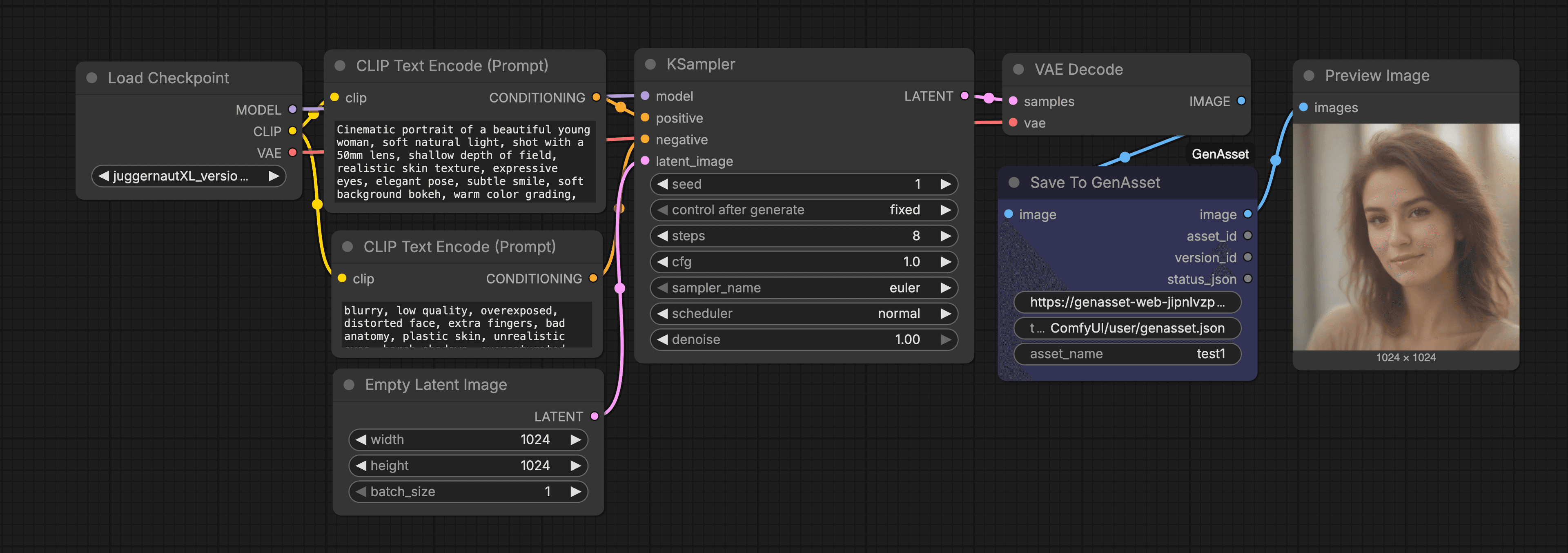
Generates an image and saves it to GenAsset with prompt, model settings, workflow JSON, and preview.
About
Generate an image and save it into GenAsset as a version.
What it does
Stores image + recipe metadata (prompt/model/settings/workflow) in GenAsset and outputs preview.
How to use
- In GenAsset, open Settings -> Tokens and create a workspace token.
- In your ComfyUI folder, create `user/genasset.json` with:
- In this workflow, keep `base_url` as `https://genasset.xyz` and `token` as `ComfyUI/user/genasset.json`.
- Fill any `PASTE_*` fields, then Queue Prompt.
Token setup
Create ComfyUI/user/genasset.json with your workspace token, then keep node token inputs as ComfyUI/user/genasset.json.
{
  "base_url": "https://genasset.xyz",
  "workspace_token": "PASTE_TOKEN"
}