Introduction
Getting started
Start with the onboarding flow: sign in, create a dashboard token, download hello-genasset, run it in ComfyUI, then verify the saved asset.
Quick start
GenAsset is a memory layer for image generation. It stores the preview and the recipe behind it so a useful output can be reproduced, shared, compared, and continued later.
Create token
Create one workspace token for ComfyUI, Codex, or API calls.
Save output
Send the image plus prompt, model, seed, workflow JSON, and metadata.
Load version
Return to the exact asset version when you want to continue.
What GenAsset captures
Assets
Versioned
Recipes
Captured
Workflows
Reloadable
Promptcinematic portrait, rain, neon alley, 50mm lens
ModeljuggernautXL_version2.safetensors
Versionsaved from ComfyUI
Intenttext_to_image
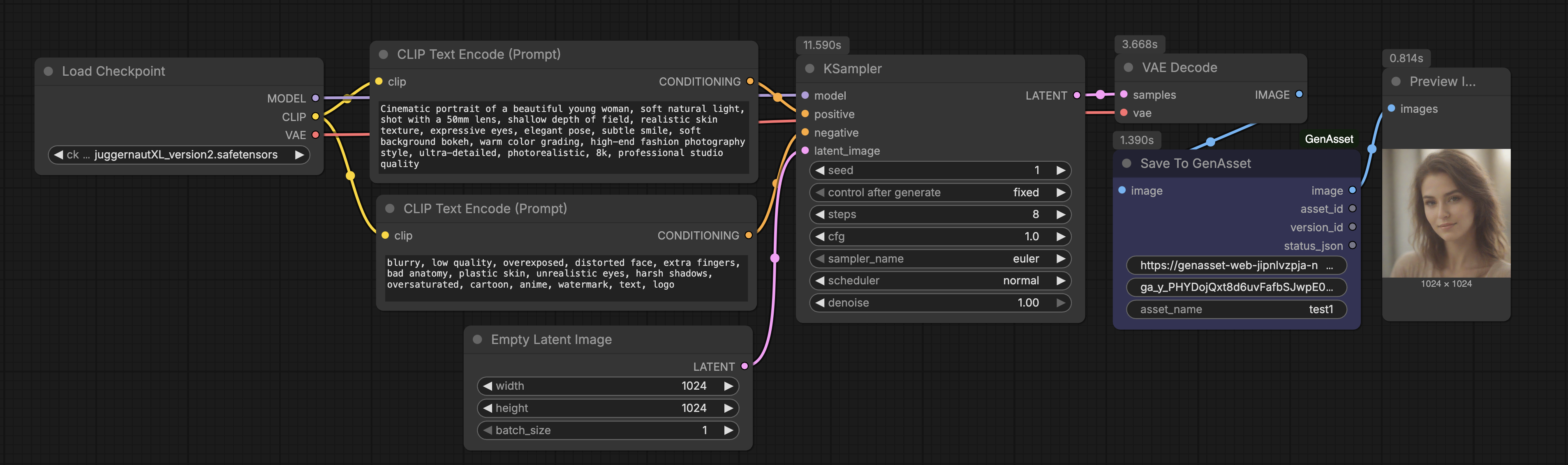
Setup path
- Sign in with Google.
- Create a workspace token from Onboarding.
- Download the tokenized
hello-genassetworkflow (download unlocks after token creation). - Install the GenAsset custom nodes in ComfyUI.
- Queue the workflow.
- Click Verify and confirm
hello-genassetappears in Assets.
Fastest path
The onboarding screen is the safe happy path: create token, download ready workflow, run once, verify saved asset.