GenAsset ComfyUI tutorial
Hello GenAsset onboarding
Use the first-run onboarding flow to get a workspace token, download hello-genasset, and save your first recipe from ComfyUI.
Goal
SOLOCloud Run validated
Use the onboarding modal to create the workspace token and download the personalized hello-genasset workflow.
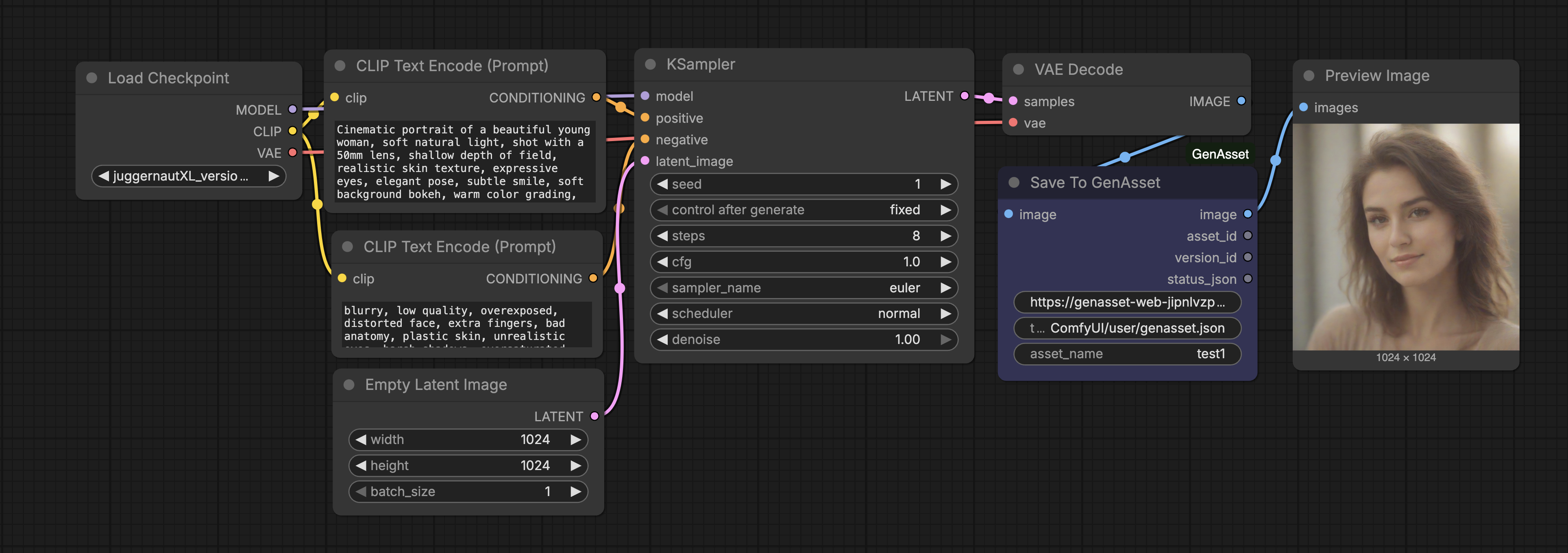
Setup
- Sign in to GenAsset and open the Start setup button in the dashboard header.
- Create the token from the onboarding flow. The workflow download unlocks only after the token is created.
- Download hello-genasset.json and open it in ComfyUI.
- Install GenAsset through ComfyUI Manager or clone ComfyUI-GenAsset into ComfyUI/custom_nodes, then restart ComfyUI.
Token rule
For onboarding, use the downloaded workflow because it is already pre-linked. For shared workflows, prefer ComfyUI/user/genasset.json so token values are not embedded in JSON files.
Steps
- Click Download in onboarding and save the personalized hello-genasset.json workflow.
- Load the workflow in ComfyUI.
- Run it once without editing the token field.
- Return to onboarding and click Verify.
- Open Assets and confirm your first saved recipe appears.
Validated run
- The workflow generator was tested with fresh users and creates a user-specific token in the Save To GenAsset node.
- The public docs do not publish real token values. Each first-run download is personalized for the signed-in workspace.
- The hello-genasset workflow is intentionally simple: it saves a small starter image and guidance notes so users can verify the loop quickly.