GenAsset ComfyUI tutorial
Recipe replay
Load a saved recipe back into ComfyUI widgets so a previous result can be recreated or adjusted.
Goal
SOLOCloud Run validated
Use a saved GenAsset recipe to refill ComfyUI widgets and recreate or adjust a previous result.
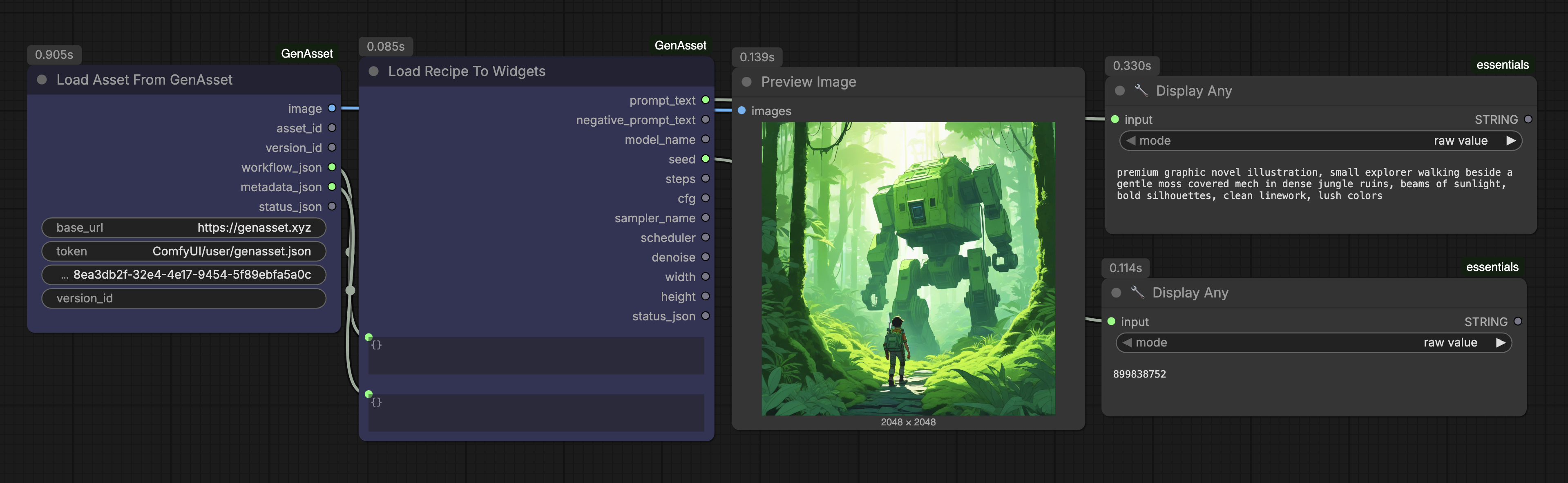
Setup
- Use the Load Recipe To Widgets catalog workflow.
- Use the version ID from a saved asset.
- The workflow reads prompt, negative prompt, seed, sampler, scheduler, steps, size, and metadata where available.
Steps
- Paste a version_id from the dashboard.
- Queue once to load recipe fields.
- Review the loaded widgets before generating.
- Adjust only the fields you want to change.
- Save the new result through Save To GenAsset.
Validated run
- The catalog workflow uses Load Version From GenAsset and helper nodes to expose recipe values.
- This tutorial explains only the GenAsset custom nodes; normal generation nodes remain standard ComfyUI wiring.