GenAsset ComfyUI tutorial
Image to image
Load a saved image, use it as the input for an edit, then save the next version into the same asset history.
Goal
SOLOCloud Run validated
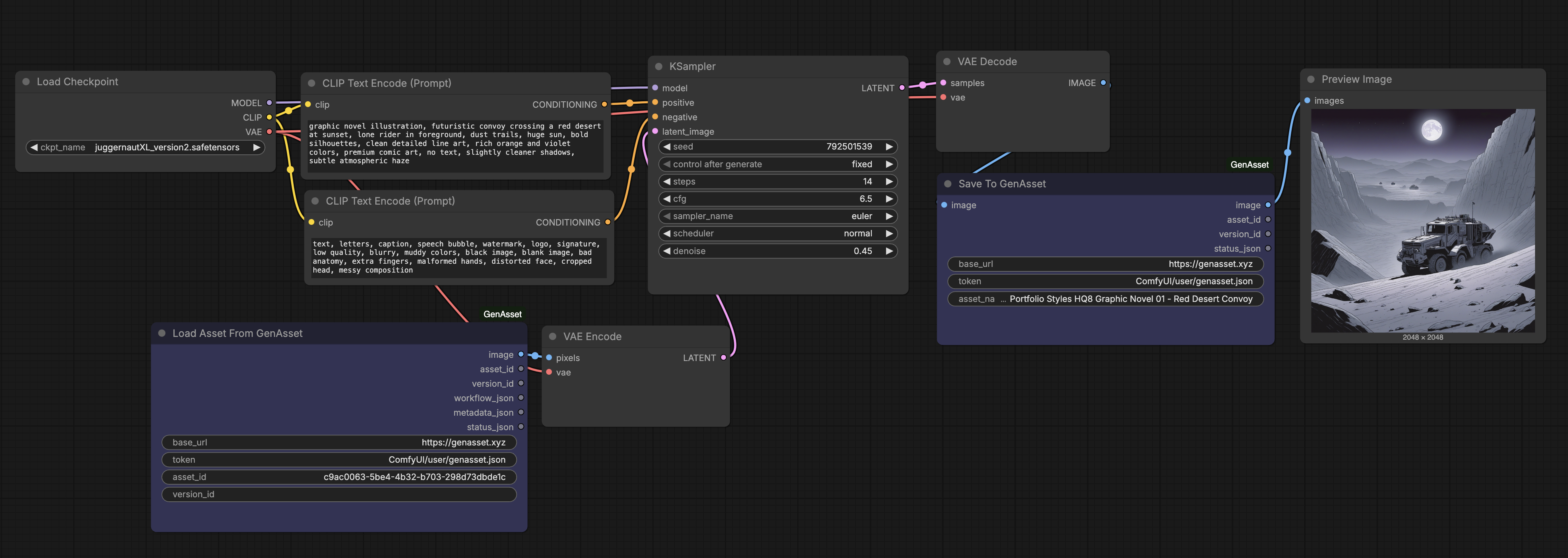
Continue from a saved image and save the edited result as the next version of the same asset.
Setup
- Use Load Asset From GenAsset or Load Version From GenAsset for the source image.
- Send the loaded image into the image input your img2img or edit workflow expects.
- Save the decoded result back through Save To GenAsset with the same asset_id or stable asset_name.
Steps
- Paste the source asset_id or version_id.
- Adjust the edit prompt and denoise.
- Queue the workflow.
- Open the asset page and confirm a new version appears in the horizontal version strip.
- Use Compare if you need to review what changed.
Validated run
- The tutorial asset was loaded, branched, patched, compared, and promoted in Cloud Run.
- Use the same wiring pattern for img2img: Load image, edit, Save To GenAsset, PreviewImage.